Angular update fails from 11 to 12
New Discussion
Dear infragistics team,
we tried different approaches to update from angular 11 to 12. Unfortunately, it looks like there is an internal issue with the library.
Here you can see the error during the update.
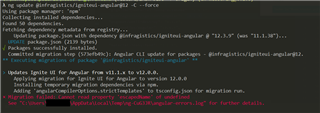
Here comes a part of the package.json
{
  "name": "xyz",
  "version": "0.1.0",
  "scripts": {
    "ng": "ng",
    "start": "ng serve",
    "build": "ng build"
  },
  "private": false,
  "dependencies": {
    "@angular/animations": "12.2.15",
    "@angular/cdk": "12.2.13",
    "@angular/common": "12.2.15",
    "@angular/compiler": "12.2.15",
    "@angular/core": "12.2.15",
    "@angular/forms": "12.2.15",
    "@angular/material": "12.2.13",
    "@angular/material-moment-adapter": "12.2.13",
    "@angular/platform-browser": "12.2.15",
    "@angular/platform-browser-dynamic": "12.2.15",
    "@angular/router": "12.2.15",
    "@infragistics/igniteui-angular": "11.1.38",
    "material-icons-font": "2.1.0",
    "moment": "2.29.1",
    "rxjs": "6.6.3",
    "tslib": "^2.0.0",
    "web-animations-js": "^2.3.2",
    "zone.js": "~0.11.4"
  },
  "devDependencies": {
    "@angular-devkit/build-angular": "12.2.15",
    "@angular-eslint/builder": "1.2.0",
    "@angular-eslint/eslint-plugin": "1.2.0",
    "@angular-eslint/eslint-plugin-template": "1.2.0",
    "@angular-eslint/schematics": "1.2.0",
    "@angular-eslint/template-parser": "1.2.0",
    "@angular/cli": "12.2.15",
    "@angular/compiler-cli": "12.2.15",
    "@types/bootstrap": "4.2.1",
    "@types/jasmine": "3.10.3",
    "@types/node": "14.14.13",
    "@typescript-eslint/eslint-plugin": "4.3.0",
    "@typescript-eslint/parser": "4.3.0",
    "eslint": "7.23.0",
    "eslint-plugin-import": "2.22.1",
    "eslint-plugin-jsdoc": "30.7.6",
    "eslint-plugin-prefer-arrow": "1.2.2",
    "jasmine-core": "4.0.0",
    "karma": "6.3.11",
    "karma-chrome-launcher": "3.1.0",
    "karma-headless-chrome-launcher": "0.0.6",
    "karma-jasmine": "4.0.1",
    "karma-jasmine-html-reporter": "1.7.0",
    "ng-packagr": "12.2.6",
    "typescript": "4.3.5"
  }
}
As mentioned in the screenshot above, we tried to update the library by the command
ng update @infragistics/igniteui-angular@12 -C --force
I can ensure you, that the whole “node_modules” was deleted and the dependencies got reinstalled via npm install –force. Also, the package-lock.json matches with the package.json and is up2date.
Please have a look.
FYI: We also tried different approaches/orders for the angular 12 update. Eventually, we came up to install igx in the last step (so please don’t suggest changing the update order or trying to follow the instructions on your update page).
Best regards,
Y. Löffler
Replies
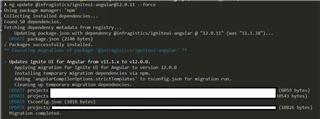
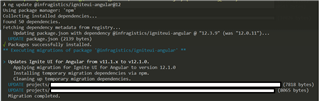

- You must be logged in to reply to this topic.
 Yannick Löffler


