Azure DevOps Pipelines – Aware of purchased license during build
New Discussion
Hello,
I’ve created a CI/CD pipeline in Azure DevOps to be able to build an exe installer. The code makes use of Infragistics but the Infragistics components are showing up as unlicensed. How can we set up our build pipeline to be aware of our purchased license during the build?
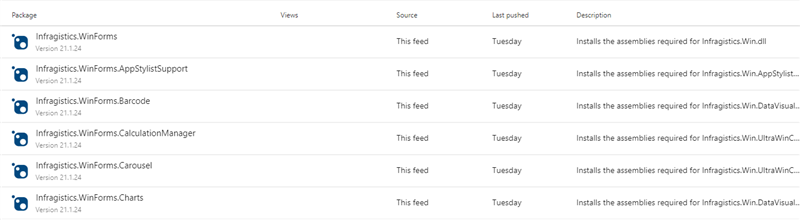
Note: We have added all the required Infragistics NuGet packages to our Azure DevOps feed which is working fine.
Thank you
Sign In
to post a reply
Replies

- You must be logged in to reply to this topic.
Discussion created by
Favorites
Replies
Created On
Last Post
Discussion created by
 John Gibbons
Favorites
0 Replies
3 Created On
Sep 24, 2021 Last Post
5 years ago Suggested Discussions
DISCUSSION
VIEWS
REPLIES
LAST POST
Deploying application to Azure DevOps
I am attempting to deploy my working version to an Azure DevOps hosting site and I am getting the f…

VIEWS
123,788
REPLIES
4
LAST POST
5 years, 3 months ago Azure DevOps Licence Issue
When I publish my vb.net windows form project into Azure DevOps it gives me the following error (th…

VIEWS
91,540
REPLIES
5
LAST POST
6 years, 4 months ago Azure build errors
I am using AG/IG ~12.3, I get the following build errors in Azure (but not in local): Error: node_m…
VIEWS
294,128
REPLIES
8
LAST POST
4 years, 5 months ago Building solution without installing license on Build Agent
Hi, we are running into a major roadblock when building our solution as part of our build pipeline.…


VIEWS
189,490
REPLIES
7
LAST POST
7 years, 5 months ago 