Skip to content

Infragistics Community Forum / Web / Ignite UI for jQuery / How to add Dynamic checkbox Columns in ig:WebHierarchicalDataGrid

How to add Dynamic checkbox Columns in ig:WebHierarchicalDataGrid

New Discussion
pughazendhi C
pughazendhi C asked on Jul 30, 2020 9:08 AM

Hi

I am working on a ASP.NET project.I am new to Infragistics.

I have a requirement to add check box column dynamically. I have 3 fixed columns those are BoundFields.

My Requirement is,

After bunding 3 fixed columns I have to add checkbox column dynamically in the code behind and need to bind value based on value getting from the database.

or 

Please suggests me any other best option. Please find grid view screenshot and code.

Please provide me some sample code  would be appreciable

Design View:

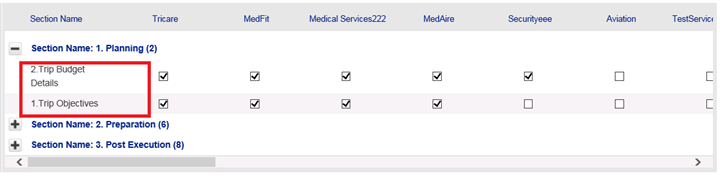
I need to make column dynamic marked in red. Currently these columns are static. I need to make all checkbox column dynamically binding


Code


Sign In to post a reply

Replies

  • 0
    Martin Asenov
    Martin Asenov answered on May 14, 2020 7:39 AM

    Hello,

    Thank you for posting in our community.

    Please keep in mind that this section of the forums is about our Ignite UI for JavaScript toolset. In the future, please make sure that your queries are submitted in the corresponding section in our forum. This way we can address your issues more accurately.

    I have created a sample illustrating how your requirement could be achieved by defining a custom template class in code-behind. Please test it on your side and let me know how it behaves.

    If this is not an accurate demonstration of what you are trying to achieve please feel free to modify it and send it back to me along with steps to reproduce.

    Looking forward to hearing from you.

    7433.Sample.zip

    • 0
      pughazendhi C
      pughazendhi C answered on May 24, 2020 9:14 AM

      Hi,

      Thanks for you swift response.The Sample which you have shared been working fine.

      But I have another issue while getting the checkbox control or

      how to get checkbox control and check whether it has checked or not. I am getting object reference error while getting checkbox control.

      Please find below code which I have tried to get control but checkbox returning null.

      public static object GetWebGridControl(Infragistics.Web.UI.GridControls.GridRecord row, string cntName, string templateName = null)
              {
                  if (templateName != null)
                      return row.Items.FindItemByKey(templateName).FindControl(cntName);
                  else
                      return row.Items.FindItemByKey(cntName).Value;
              }
              
              //I am passing row and controlid,template key)
              
              CheckBox cpFocus = UIHelper.GetWebGridControl(row, "chk-" + tripFocus.vchTripFocusName, null) as CheckBox;

      "CpFocus" returning null. Because it is not getting control.

      sample html code for one dynamic checkbox I got from view source of the grid page

      <input name="ctl00$ctl00$ctl00$TopHeader$MainMenu$AdminPageContent$WebHierarchicalDataGrid$ctl00$it4_2$chk-MedFit"
      id="ctl00_ctl00_ctl00_TopHeader_MainMenu_AdminPageContent_WebHierarchicalDataGrid_ctl00_it4_2_chk-MedTest"
      type="checkbox" checked="checked">

      Please assist me how to get the dynamic template check control code behind and I need to store it into database.

      Thanks in Advance. Please help me out to resolve the issue ASAP. 

      Thanks

    • 0
      pughazendhi C
      pughazendhi C answered on May 25, 2020 6:36 AM
      I am appending to the previous post which I have posted.
      I have modified my code to get the checkbox but still I am getting null exception for the checkbox control.
      Here is my code
      Code to generate the ItemTemplate dynamically
       public void GenerateTemplatedColumn(List<TemplateColumn> TempColumn)
          {
            
              int count = 0;
              foreach(var col in dtBindConfig.Columns)
              {
                  if (count > 3)
                  {
                      string colName = Regex.Replace(col.ToString(), @"\s+", "");//removing spaces from the TempColumns
                      TemplateDataField templateCol = new TemplateDataField();
                      templateCol.Key = colName.ToString();
                      templateCol.Header.Text = colName.ToString();
                      templateCol.Width = Unit.Percentage(8);
                      templateCol.ItemTemplate = new CustomItemTemplate();
                      this.WebHierarchicalDataGrid.Columns.Add(templateCol);
                  }
                
                  count = count + 1;
              }
          }
      The below code for binding value and setting ID for Checkbox/Template column dynamically
       private class CustomItemTemplate : ITemplate
          {
              public void InstantiateIn(Control container)
              {
                  string columnKey = (((GridRecordItem)(((TemplateContainer)container).Item)).Column).Key;
                  string spaceFreeColumnKey = Regex.Replace(columnKey, @"\s+", "");
                  CheckBox checkbox = new CheckBox();
                  checkbox.ID = "chk" + spaceFreeColumnKey;          
                  checkbox.Checked = (bool)DataBinder.Eval(((TemplateContainer)container).DataItem, spaceFreeColumnKey);                  
                  container.Controls.Add(checkbox);
              }
          }
      Below code I have written to get the values from  WebHierarchicalDataGrid save button click
       private int UpdateCheckBoxValuetoDatabase(WebHierarchicalDataGrid grdCtrl)
          {
       foreach (GridRecord row in grdCtrl.Rows)
              {
                 
                  SectionId = Convert.ToInt32(UIHelper.GetWebGridControl(row, "iSectionID"), CultureInfo.InvariantCulture);
           List<TemplateColumn> TempColumn =GetDynamicTemplateColumns(); //Getting all dynamic check box columns will returns all checkbox column names
               
                  int cnt = 0;
                  foreach (var columnName in TempColumn)
                  {
                      string tripfocus = Regex.Replace(tripFocus.vchTripFocusName, @"\s+", "");
                      string ID = "chk" + columnName;
                      string templateName = columnName;
                      CheckBox chkTripFocus = UIHelper.GetWebGridControl(row, ID, templateName) as CheckBox;//this method to find the checkbox by Template key and CheckBoxID but here returns null
                    
                      if (chkTripFocus.Checked)
                      {
                          bActive = true;
                      }
                      configureSection.vchTripFocusName = tripFocus.vchTripFocusName;
                      configureSection.iSectionID = SectionId;
                      configureSection.bActive = bActive;
                      // ntmClient.UpdateTripSectionMapped(configureSection);
                  }
      }
      The chkTripFocus alway returning null. I suspected that ID was wrong in the Grid but I am using the same to get the checkbox control. still I am getting null reference error.
      Below code to find the countrol based on control ID or Template Key
      public static object GetWebGridControl(Infragistics.Web.UI.GridControls.GridRecord row, string cntName, string templateName = null)
              {
                  if (templateName != null)
                      return row.Items.FindItemByKey(templateName).FindControl(cntName);
                  else
                      return row.Items.FindItemByKey(cntName).Value;
              }
      Please help me out how to get check box row from the Grid. I have to resolve urgently I am doing some POC please help ASAP
      Thanks
      • 0
        Martin Asenov
        Martin Asenov answered on May 26, 2020 2:29 PM

        Hi,

        In order for the template to be available, the EnableDataViewState property of WebHierarchicalDataGrid has to be set to true. Then inside the click handler, the EnsureTemplates method has to be called.

        I have modified and attached the sample I had sent to meet your new requirement. Let me know if that solves your issue.

        3681.Sample.zip

      • 0
        pughazendhi C
        pughazendhi C answered on Jul 20, 2020 9:30 AM

        Thanks for reply.Its working fine.

        I have some issue related to Sorting WebHierarchicalDataGrid .. Below is my code where I am binding dynamically generated columns to WebHierarchicalDataGrid .

        WebHierarchicalDataGrid.DataSource = ds;
         GenerateBoundFieldColumn();
        GenerateTemplatedColumn(xmlConfigSection, dtBindConfig, isSaved);
        this.WebHierarchicalDataGrid.GroupingSettings.GroupedColumns.Add("vchMainSection");
        this.WebHierarchicalDataGrid.GroupingSettings.GroupAreaVisibility = Infragistics.Web.UI.GridControls.Visibility.Hidden;
        WebHierarchicalDataGrid.DataBind();

        The below code I am dynamically creating BoundField

        public void GenerateBoundFieldColumn()
        {
        BoundDataField boundField = new BoundDataField();
        boundField.Key = "vchMainSection";
        boundField.Header.Text = "Section Name";
        boundField.Width = Unit.Percentage(18);

        BoundDataField boundFieldSubSection = new BoundDataField();
        boundFieldSubSection.Key = "vchSubSection";
        boundFieldSubSection.Header.Text = "Section Name";
        boundField.Width = Unit.Percentage(18);
        boundField.Hidden = true;

        BoundDataField boundFieldSectionID = new BoundDataField();
        boundFieldSectionID.Key = "iSectionID";
        boundFieldSectionID.Header.Text = "";
        boundFieldSectionID.Hidden = true;
        boundField.Width = Unit.Percentage(0);
        boundField.CssClass = "clmDisabled";

        this.WebHierarchicalDataGrid.Columns.Add(boundField);
        this.WebHierarchicalDataGrid.Columns.Add(boundFieldSubSection);
        this.WebHierarchicalDataGrid.Columns.Add(boundFieldSectionID);

        }

        My issue is, I want to sort by specific integer column (iSectionID) which is already hidden.

        I want override Groupsettings order by. I want to default sorting based on iSectionID. 

        Please help me out how to do sorting after grouping or suggest me the possible way to customize based on specific integer column.

      • 0
        Martin Asenov
        Martin Asenov answered on Jul 23, 2020 9:52 AM

        Hi,

        My suggestion is to take a look at this help topic.

        I have modified and attached the previous sample, demonstrating how to sort a given column using JavaScript method mentioned in the topic for your reference.

        Please let me know if you need more information.

        6712.Sample.zip

      • 0
        pughazendhi C
        pughazendhi C answered on Jul 24, 2020 10:27 AM

        Hi, 

        Thanks for your quick response. I tried the below code from the help topic , But still sorting is not working for me

        This is my Page load code I am adding after binding data into the grid

         this.WebHierarchicalDataGrid.RowIslandDataBinding += new RowIslandEventHandler(WebHierarchicalDataGrid_RowIslandDataBinding); in page load.

        WebHierarchicalDataGrid is my grid ID,

        protected void Page_Load(object sender, EventArgs e)
        {

        MessageControl.HideMessage();

        if (!IsPostBack)
        {
        this.WebHierarchicalDataGrid.Columns.Clear(true);

        BindToGrid();

        this.WebHierarchicalDataGrid.RowIslandDataBinding += new RowIslandEventHandler(WebHierarchicalDataGrid_RowIslandDataBinding);

        }

        if (IsPostBack)
        {
        this.WebHierarchicalDataGrid.EnsureTemplates();
        }

        }

        After initializing the RowsIslandDataBinding event , I am creating the event method

        void WebHierarchicalDataGrid_RowIslandDataBinding(object sender, RowIslandEventArgs e)
        {
        // Sort a Column in PARENT BAND
        if (e.RowIsland.DataMember == "SqlDataSource1_DefaultView")
        {
        Sorting sort = e.RowIsland.Behaviors.Sorting;
        sort.SortedColumns.Add("vchMainSection", Infragistics.Web.UI.SortDirection.Ascending);
        }
        // Sort a Column in CHILD BAND
        if (e.RowIsland.DataMember == "SqlDataSource2_DefaultView"
        && e.RowIsland.ParentRow == this.WebHierarchicalDataGrid.GridView.Rows[1])
        {
        Sorting sort = e.RowIsland.Behaviors.Sorting;
        sort.SortedColumns.Add(e.RowIsland.Columns[2], Infragistics.Web.UI.SortDirection.Ascending);
        }
        }

        Still Sorting is not working.

        ScreenShot of my Grid

        Gird

        Red highlighted one vchSubsection as per my requirement 1. Trip Objective should come first.

        I tried to sort by iSectionID which identity is  column(1,2,3..). But it was not working ,then I have appended 1 and 2 before each vchSubSection  column to sort in ascending order in the grid.That one also not sorting properly.

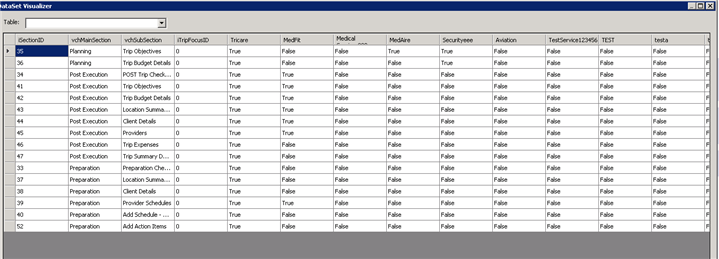
        Below one is screenshot of my Dataset to bind Grid

        I am doing grouping by Column[1].ie, vchMainSection after grouping I am trying to do sorting by 

        Column[2] .ie, vchSubSection 

        Dataset to Bind Grid

        I am using infragistics assembly version –> Assembly="Infragistics45.Web.v16.2, Version=16.2.20162.2013, Culture=neutral, PublicKeyToken=7dd5c3163f2cd0cb"

        Please help out how to do sorting after grouping by vchMainSection Column.

        I have do sorting by sub section marked in red first screenshot or  another other option also fine for me to achieve sorting.

        Please also suggest me if any other options.

        I am waiting for your help.

        Thanks

      • 0
        Martin Asenov
        Martin Asenov answered on Jul 30, 2020 9:08 AM

        Hi,

        I have modified the sample demonstrating how the sorting works from the code-behind. Your issue could be caused by e.RowIsland.DataMember being empty(as it is in the sample since a DataSet is used) or being with a different name.

        Please test the sample on your side and let me know whether it helps you achieve your requirement.

        1033.Sample.zip

  • You must be logged in to reply to this topic.
Discussion created by
Favorites
Replies
Created On
Last Post
Discussion created by
pughazendhi C
Favorites
0
Replies
8
Created On
Jul 30, 2020
Last Post
5 years, 7 months ago

Suggested Discussions

Created by

Created on

Jul 30, 2020 9:08 AM

Last activity on

Feb 23, 2026 8:13 AM