Skip to content

Exported Excel file corrupted

New Discussion
Jason Landreth
Jason Landreth asked on Aug 6, 2020 4:03 PM

When I export some grids to excel ".xlsx" format some of the excel files tell me that they are corrupted using v19.2 excel exporter

Example grid:

And after I click "Yes" the file will be repaired.
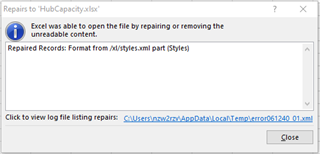
The log file


	error061240_01.xml
	Errors were detected in file 'D:\HubCapacity.xlsx'
	
		Repaired Records: Format from /xl/styles.xml part (Styles)
	

Sign In to post a reply

Replies

  • 0
    Divya Jain
    Divya Jain answered on Jul 29, 2020 9:16 PM

    Hello Jason,

    Thank you for contacting. I did little research and find same log is been discussed here. But also this is very old post , I am not expecting that we have the same culture specific separator issue again here.

    So may I know which grid feature you enabled in the grid ? Does any special architecture of the column header causing this? Try to narrow down the issue and update us.

    The best way for us to assist you is if you provide a small isolated sample that we can run with the same xlsx file and use for debugging locally.

    Looking forward to hear you back.

    Sincerely,
    Divya Jain

    • 0
      Jason Landreth
      Jason Landreth answered on Aug 4, 2020 1:50 PM

      I have tried to upload a sample that shows how the error is cause. Can I email it to you?

      • 0
        Divya Jain
        Divya Jain answered on Aug 4, 2020 3:40 PM

        Hello,

        You can delete the bin/package folder and zip the sample and then try to attach again. If you still not able to attach it then email to support@infragistics.com.

      • 0
        Jason Landreth
        Jason Landreth answered on Aug 4, 2020 3:52 PM

        ExportExcelErrorTest.zipI have narrowed it down to the InitializeColumn event for the excel export where the column format is assigned to the excel format.

        This works if I am exporting to a .xls file format but gives a file corrupted if trying to export to .xlsx.

      • 0
        Jason Landreth
        Jason Landreth answered on Aug 4, 2020 5:04 PM

        I have to back track, it does give an error on xls as well but not a corruption error. Says that data could be lost.

      • 0
        Divya Jain
        Divya Jain answered on Aug 5, 2020 5:40 PM

        Hello Jason,

        Thank you for your sample application. I am able to reproduce the issue you described. When i click the export button first i was getting error "we found a problem with some content in test.xlsx. Do you wants us to recover as much as we can …" and then the repair window .i debug the code and find issue is from 'excelExporter_InitializeColumn' when you set ExcelFormatStr. 

        which looks like a bug to me. I am going to create a private case 'CAS-208545-L6Z7Z2' and attach the bug. 

        You can access this private case from infragistics account 'Support Activity' page.

        Let me know if you have any question.

        -Divya Jain

      • 0
        Jason Landreth
        Jason Landreth answered on Aug 6, 2020 4:03 PM

        I don't see anything under Support Activity in My Account.

  • You must be logged in to reply to this topic.
Discussion created by
Favorites
Replies
Created On
Last Post
Discussion created by
Jason Landreth
Favorites
0
Replies
7
Created On
Aug 06, 2020
Last Post
5 years, 6 months ago

Suggested Discussions

Created by

Created on

Aug 6, 2020 4:03 PM

Last activity on

Aug 6, 2020 4:03 PM
