Unable to create grid using Html.Infragistics().Grid() and get error "Unexpected token '<'
New Discussion
Hi,
I recently create a new .NET 6 web app project and want to use igGrid in my project. I was used to the C# MVC way (Html.Infragistics().Loader() $ Html.Infragistics().Grid()) to create the grid (instead of jquery way like $.ig.Loader & $(‘#id’).igGrid({})) but it return error “SyntaxError: Unexpected token ‘<‘, ” <script Ty”… is not valid JSON“.
Project structure, all IgniteUI css and js files are under wwwroot folder:
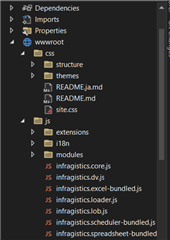
Nuget package: Infragistics.Web.AspNetCore (6.22.2.7)
The css and scripts referenced:
<link href=”/css/themes/infragistics/infragistics.theme.css” rel=”stylesheet” />
<link href=”/css/structure/infragistics.css” rel=”stylesheet” />
<script src=”“>code.jquery.com/…/script>
<script src=”“>code.jquery.com/…/script>
<script src=”/js/infragistics.core.js”></script>
<script src=”/js/infragistics.lob.js”></script>
<script src=”/js/infragistics.loader.js”></script>
Then, I have my controller code that return dummy records array to the Workbench.cshtml partial view.
Workbench.cshtml:
@using Infragistics.Web.Mvc
@model TestProjecte.Models.DummyModel

@(Html.Infragistics().Loader()
            .ScriptPath(Url.Content("/js/"))
            .CssPath(Url.Content("/css/"))
            .Theme("bootstrap")
            .Render())

@(Html.Infragistics().Grid(Model.Records.AsQueryable())
                .ID("tblRecords")
                .FixedHeaders(true)
                .DefaultColumnWidth("130px")
                .AutoGenerateColumns(false)
                .Columns(column =>
                {
                    column.For(x => x.Id).HeaderText("Id").ColumnCssClass("text-center").HeaderCssClass("text-center");
                    column.For(x => x.StartTime).HeaderText("Start Time").ColumnCssClass("text-center").HeaderCssClass("text-center").DataType("date").Format("yyyy-MM-dd HH:mm:ss.fff").Width("200px");
                    column.For(x => x.EndTime).HeaderText("End Time").ColumnCssClass("text-center").HeaderCssClass("text-center").DataType("date").Format("yyyy-MM-dd HH:mm:ss.fff").Width("200px");
                    column.For(x => x.Dur).HeaderText("Duration (s)").ColumnCssClass("text-center").HeaderCssClass("text-center");
					column.For(x => x.Location).HeaderText("Location").ColumnCssClass("text-center").HeaderCssClass("text-center");
                })
                .Virtualization(false)
                .Render())
May I know what did I miss out, is it missing Nuget package reference, wrong jquery version, or the way I use Html.Infragistics().Loader() is wrong (I was coming from .NET Framework project which creates the grid this way)? Any pointer or help is great, thanks!
Replies

- You must be logged in to reply to this topic.
 Pui Yee Poon


