Skip to content

Infragistics Community Forum / Web / Ignite UI for Angular / NullInjectorError: No provider for InjectionToken IgxDropDownBaseToken!

NullInjectorError: No provider for InjectionToken IgxDropDownBaseToken!

New Discussion
Jean-Paul Saade
Jean-Paul Saade asked on Sep 22, 2021 12:53 PM

Here’s what I’m trying to do:

I’m using Angular 12.
I’m wrapping all of the ignite components in my custom wrappers with custom @Input() and @Output().

I reached the part where I want to wrap IgxDropDownComponent and IgxDropDownItemComponent into my own wrappers, respectively called <supy-dropdown> and <supy-dropdown-item>.
I am then exporting those 2 components in `DropdownModule` then reuse it in my other components.

dropdown.component.ts:

import { IgxDropDownComponent } from 'igniteui-angular';
import { Component, ViewChild } from '@angular/core';

@Component({
  selector: 'supy-dropdown',
  templateUrl: './dropdown.component.html',
  styleUrls: ['./dropdown.component.scss'],
})
export class DropdownComponent {
  @ViewChild('dropdown') dropdown: IgxDropDownComponent;
}

dropdown.component.html:


dropdown-item.component.ts:

import { ChangeDetectionStrategy, Component } from '@angular/core';

@Component({
  selector: 'supy-dropdown-item',
  templateUrl: './dropdown-item.component.html',
  styleUrls: ['./dropdown-item.component.scss'],
  changeDetection: ChangeDetectionStrategy.OnPush,
})
export class DropdownItemComponent {}

dropdown-item.component.html:


dropdown.module.ts:

import { IgxDropDownModule, IgxToggleModule } from 'igniteui-angular';
import { CommonModule } from '@angular/common';
import { NgModule } from '@angular/core';

import { DropdownComponent } from './dropdown.component';
import { DropdownItemComponent } from './dropdown-item';

@NgModule({
  declarations: [DropdownComponent, DropdownItemComponent],
  imports: [CommonModule, IgxDropDownModule, IgxToggleModule],
  exports: [DropdownComponent, DropdownItemComponent, IgxDropDownModule, IgxToggleModule],
})
export class DropdownModule {}

and finally header.component.html:


…


test


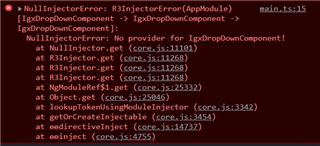
This is the error that I am receiving:
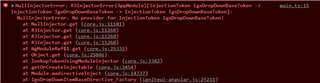
Any help would be appreciated!

Sign In to post a reply

Replies

  • 0
    Tihomir Tonev
    Tihomir Tonev answered on Sep 7, 2021 3:51 PM

    Hello,

    Thank you for posting on our forums.

    You will need to add an InjectionToken just as the error says. First you will need to create the token, as I believe it is not exposed to be directly imported:

    export const IGX_DROPDOWN_BASE = new InjectionToken<IDropDownBase>('IgxDropDownBaseToken');

    then you will need to register it to the providers list:

    providers: [{ provide: IGX_DROPDOWN_BASE, useExisting: IgxDropDownComponent }]

    and inject it in the constructor of your component:

    @Inject(IGX_DROPDOWN_BASE) protected dropDown: IDropDownBase.

    I believe should get the error fixed and keep you going.

    Sincerely,

    Tihomir Tonev
    Associate Software Developer
    Infragistics

    • 0
      Jean-Paul Saade
      Jean-Paul Saade answered on Sep 8, 2021 10:13 AM

      Hello Tihomir,
      I have tried your solution by creating and providing the token in app.module.ts, and proceeded to inject it in `dropdown.component.ts` constructor but I am still receiving the same error.
      Should I provide the token in another module? Or inject it in the header component?
      Also if I have to inject it in the header component, that would mean i'd have to do it in each component that might import my custom dropdown module.
      Thank you

    • 0
      Jean-Paul Saade
      Jean-Paul Saade answered on Sep 9, 2021 7:40 AM

      Hello again,

      So I was able to implement your solution, but now I am receiving a new error:

      Thank you again!

    • 0
      Jean-Paul Saade
      Jean-Paul Saade answered on Sep 9, 2021 8:44 AM

      For simplicity reasons, I was able to mimic the original error here.

      • 0
        Tihomir Tonev
        Tihomir Tonev answered on Sep 9, 2021 3:08 PM

        Hello,

        Thank you for the provided project.

        Generally when creating providers in appmodule.ts, if the provider there is with the same name as the one that would be provided by a module on another level, the one provided in root will always overwrite the other one.

        However, since its very likely that when IgxDropDown comes from npm with all its dependancies, to be still looking at the original injection token, regardless of the one provided in your application.

        I am not sure if there is a workaround on this, maybe the best solution will be to have the token public so it can be accessed. So I would advice to post this as a feature request on our GitHub repository here:

        https://github.com/IgniteUI/igniteui-angular/issues/new?assignees=&labels=feature-request&template=feature_request.md&title=

        You can include the link to this forum post as well.

        Please let me know if you have any further questions or concerns.

        Sincerely,
        Tihomir Tonev
        Associate Software Developer
        Infragistics

      • 0
        Roman
        Roman answered on Sep 22, 2021 12:53 PM

        Tihomir, we currently fixed it like this:

        const IGX_DROPDOWN_BASE = (IgxDropDownItemBaseDirective as any).ctorParameters()[0].decorators[0]
          .args[0] as InjectionToken;
          
        @Component({
        ........
          providers: [
            {
              provide: IGX_DROPDOWN_BASE,
              useExisting: DropdownComponent,
            },
          ],
        })
        .......

        This is really ugly but it works.
        Hope you will make the token public soon.

        P.S. the solution you provided won't work because the token will just have different reference.

  • You must be logged in to reply to this topic.
Discussion created by
Favorites
Replies
Created On
Last Post
Discussion created by
Jean-Paul Saade
Favorites
0
Replies
6
Created On
Sep 22, 2021
Last Post
5 years ago

Suggested Discussions

Created by

Created on

Sep 22, 2021 12:53 PM

Last activity on

Feb 12, 2026 7:58 AM