Skip to content

Infragistics Community Forum / Web / Ignite UI for Angular / How can i prevent dropdown list to scroll over input ?

How can i prevent dropdown list to scroll over input ?

New Discussion
David Smith
David Smith asked on Aug 19, 2022 8:02 AM

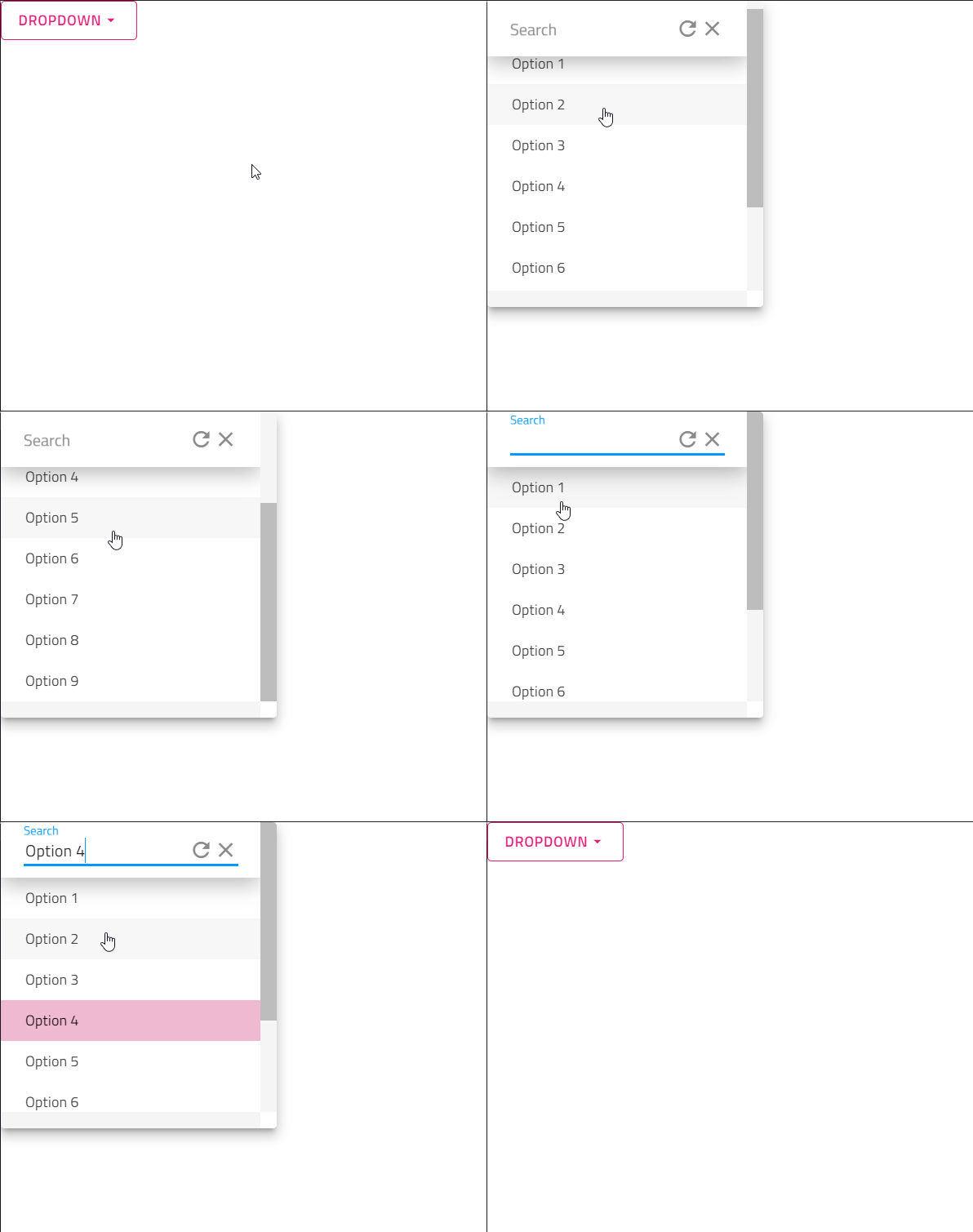
I would like to find a way how I can keep my search text displayed in a dropdown box and not scrolled over by the dropdown items. In my case i have a dropdown box that has on top a search box that allows user to filter the list to narrow down the items. The filter etc. works fine, the only issue i am having is that once the user starts scrolling it will scroll over the search box. How could i achieve that ?

This is what the dropdown looks before scroll

And that’s when i scroll

My Templete Code


And this is my styleSheet


.grid__wrapper {
    margin: 10px 16px;
}

button {
    border: 1px solid;
    margin-bottom: 0;
}

.drop-down__scroll-container {
    height: 300px;
    padding-top: 16px;
    overflow: scroll;
}

::ng-deep {
    .filter-input {
        .igx-input-group {
            position: sticky;
            top: -16px;
            background-color: white;
            padding: 11px 22px;
            -webkit-box-shadow: 0px 7px 20px 0px rgba(0, 0, 0, 0.26);
            -moz-box-shadow: 0px 7px 20px 0px rgba(0, 0, 0, 0.26);
            box-shadow: 0px 7px 20px 0px rgba(0, 0, 0, 0.26);
        }

        .igx-input-group__bundle:hover {
            box-shadow: none
        }

        .igx-input-group__bundle {
            padding-top: 0 !important;
            box-shadow: none;
        }
    }

}


Sign In to post a reply

Replies

  • 0
    Georgi Anastasov
    Georgi Anastasov answered on Aug 18, 2022 8:03 AM

    Hello David,

    I have been looking into your question and the described behavior can be achieved using css styles. Using the z-index you can visualize the input search box above the drop-down container. In the the igx-drop-down container class you will set the z-index to be a small value and in the input-group class the z-index should be a value greater than that of the container with the drop-down items.

    .drop-down__scroll-container {
        height: 300px;
        padding-top: 16px;
        overflow: scroll;
        z-index: 1;
    }
    
    .igx-input-group {
                position: sticky;
                top: -16px;
                background-color: white;
                padding: 11px 22px;
                -webkit-box-shadow: 0px 7px 20px 0px rgba(0, 0, 0, 0.26);
                -moz-box-shadow: 0px 7px 20px 0px rgba(0, 0, 0, 0.26);
                box-shadow: 0px 7px 20px 0px rgba(0, 0, 0, 0.26);
                z-index: 10;
     }

    In addition, I have prepared a small sample illustrating my suggestion which could be found here.

    Please do not hesitate to contact me if you need any further assistance with this matter.

    Regards,

    Georgi Anastasov

    Entry Level Software Developer

    Infragistics

    • 0
      David Smith
      David Smith answered on Aug 18, 2022 4:52 PM

      Thanks the Z-index solved the issue, one more question, how would i go about it to have some extra spacing between top of scroll bar and search box. Also is there a way to prevent the resize of the with after initial load since the with changes one the filtered items are smaller in size vs the unfiltered list.

      • 0
        Georgi Anastasov
        Georgi Anastasov answered on Aug 19, 2022 8:02 AM

        Hello David,

        I have been looking into your question and you can set more space between the drop-down items and the search box, as in the “.igx-input-group” class you can set a bottom margin so that there is a distance between them. Another approach is to select the first drop-down item and add a margin top to it. This can be done by selecting the first of its kind drop down item class ".igx-drop-down__item:first-of-type".

        .igx-input-group {
                    position: sticky;
                    top: -16px;
                    background-color: white;
                    padding: 11px 22px;
                    -webkit-box-shadow: 0px 7px 5px 0px rgba(0, 0, 0, 0.26);
                    -moz-box-shadow: 0px 7px 5px 0px rgba(0, 0, 0, 0.26);
                    box-shadow: 0px 7px 5px 0px rgba(0, 0, 0, 0.26);
                    z-index: 10;
                    margin-bottom: 30px;
                }
        
        .igx-drop-down__item:first-of-type{
                    margin-top: 30px;
        }
        

        Additionally, to prevent resizing when the lists are changed from unfiltered to filtered, you can set the width property of igx-drop-bottom to a certain size, so that the drop-down will have the same size regardless of the change of the two lists. Another approach that can help is to set the font size of the drop-down items to be the same on both lists, so there will be no change in resizing when switching from the unfiltered to the filtered list.

        In addition, I modified the previous sample which could be found here.

        Please keep in mind that according to our policy we handle issue per case, and since this theme is regarding to drop-down container to not scroll over search box input, my suggestion is to create additional threads if you have questions which are not directly related with the initial theme. This is for better consistency and history tracking.

        Please do not hesitate to contact me if you need any further assistance with this matter.

        Regards,

        Georgi Anastasov

        Entry Level Software Developer

        Infragistics

  • You must be logged in to reply to this topic.
Discussion created by
Favorites
Replies
Created On
Last Post
Discussion created by
David Smith
Favorites
0
Replies
3
Created On
Aug 19, 2022
Last Post
3 years, 6 months ago

Suggested Discussions

Created by

Created on

Aug 19, 2022 8:02 AM

Last activity on

Feb 12, 2026 8:49 AM