Skip to content

Ultragrid sort when GroupBy is on

New Discussion
Florin Ghinoiu
Florin Ghinoiu asked on Oct 1, 2020 3:13 PM

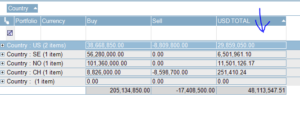
I have a grid where I do a group by Country (see attached image). After that I want to sort by another column (USDTotal) and that alone. The grid default implementation however is to sort by Country,USDTotal. This is not consistent with how the data and sort works in Excel (what our client uses as well with same data).

Currently the sort by USDTotal is applied within each group and we see it works when we collapse a row (see collapsed image).

In short we need the GroupBy but sorting should be on last column selected both on the one row per group as well as collapsed view. Any idea how to implement this?

Thank you
Sign In to post a reply

Replies

  • 0
    Andrew Goldenbaum
    Andrew Goldenbaum answered on Sep 30, 2020 1:57 PM

    Hello Florin,

    I have been investigating into your requirement in this case, and the behavior you are seeing where the rows within the groups are being sorted is actually expected. The group in itself in the UltraGrid is a sort, and as such, the column that is grouped will by default determine the sort order.

    You can change this by applying a GroupByComparer to the column that is grouped, as this will allow you to sort the actual group by rows. I am attaching a sample project that demonstrates how this could be implemented. I hope this helps.

    Please let me know if you have any other questions or concerns on this matter.

    UltraGridSortByGroupSummaryDemo

    • 0
      Florin Ghinoiu
      Florin Ghinoiu answered on Sep 30, 2020 7:43 PM

      Thank you for taking the time to answer. Unfortunately, this is not what I was looking for.
      Looking at the first image, with the groupby on Country in place, when I click on [USD Total] I would like the sort on that column and that column alone. In other words, I need to see this:
      Country 0
      Country CH 251,410
      Country SE 6,501,961
      Country NO 11,501,126
      Country US 29,859,050

      Of course when I expand a row (like US in second image) I need the data sorted within the group as well which the grid does indeed correctly.

      • 0
        Mike Saltzman
        Mike Saltzman answered on Sep 30, 2020 8:28 PM

        I am really confused as to what you want here. 

        Assuming that we remove the GroupByComparer from Andrew's sample (since that isn't what you want), the grid is Initially grouped by country. The process of grouping means that the grid MUST first sort the rows by country – so that the matching values are all together. So you end up with the Country groups in alphabetical order. 

        Under each GroupByRow, the "Number" values are in an arbitrary order… not sorting at all – or rather, they are in the original order of the rows. 

        Now… you are saying that you want the rows underneath each group to be in order by Number, right? But that is what happens by default. Like if I remove the GroupByComparer  from Andrew's sample, run it, and sort by Number, I get exactly the results you seem to be saying you want. 

        But the values you listed here as an example don't even show the child rows. And the countries are sorted, not alphabetically, but by the total (summary) value. Which is what the GroupByComparer does. 

        So… I'm baffled at this point as to what you actually want. Your description of what you want to achieve doesn't seem to match the example data you included in your last post. 

        If you want to sort the GroupByRows, then the only way to do that is to use a GroupByComparer, as in Andrwe's example, and it has to apply to the Country column, because that's the column that is grouped. 

        Perhaps what you want is to trap for AfterSortChange and watch for when the Number column is sorted and then ONLY apply the GroupByComparer when Number is sorted? 

      • 0
        Florin Ghinoiu
        Florin Ghinoiu answered on Oct 1, 2020 4:52 AM

        Bear with me for a moment so I can give it another try. Lets forget the second image as it appears to cloud the issue at stake.

        I have the grid with GroupBy Country view in place. Next I click on [USD Total].

        What my users are asking for is to see the data being sorted by [USD Total] and the result should be something like this.

        Country 0
        Country CH 251,410
        Country SE 6,501,961
        Country NO 11,501,126
        Country US 29,859,050

        Thanks again

      • 0
        Andrew Goldenbaum
        Andrew Goldenbaum answered on Oct 1, 2020 3:13 PM

        Hello Florin,

        I am rather unsure how your requirement differs from the sample project I had sent you in this case? If you click on the “Number” header in the sample project, the group by rows will be sorted by the summaries contained within the groups.

        Can you please clarify how your requirement differs from the sample project I sent you?

  • You must be logged in to reply to this topic.
Discussion created by
Favorites
Replies
Created On
Last Post
Discussion created by
Florin Ghinoiu
Favorites
0
Replies
5
Created On
Oct 01, 2020
Last Post
5 years, 5 months ago

Suggested Discussions

Created by

Created on

Oct 1, 2020 3:13 PM

Last activity on

Feb 25, 2026 11:07 AM