Design changes in Windows 11
New Discussion
Hi Infragistics Team,
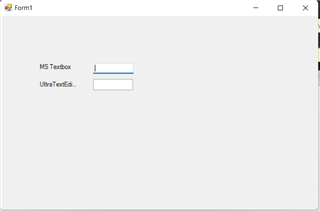
i just installed the first preview of Windows 11 and had a look an the design changes. Microsoft introduced some new shiny stuff for standard controls like textboxes. They now have a thicker line on bottom which becomes blue if the control gots the focus.
Microsoft also has an update for .NET-Framework where they introduced this changes for the standard .NET WinForms Controls.
I know it is quiet an early stage, but du you already have plans to also upgrade Infragistics Toolsets to fullfill the new design standards for Windows 11. Because currently out app looks quiet ugly on Windows 11. It does not totally fit into the rest of the applications.
Regards
Andreas
Sign In
to post a reply
Replies


- You must be logged in to reply to this topic.
Discussion created by
Favorites
Replies
Created On
Last Post
Discussion created by
 Andreas Mueller
Favorites
0 Replies
6 Created On
Nov 29, 2023 Last Post
2 years, 8 months ago Suggested Discussions
DISCUSSION
VIEWS
REPLIES
LAST POST
Clicking outside row editing is committing changes…
I’m on IG12.3 and AG 12.3. I am asking a follow-up to onrowedit default behaviour, since that…

VIEWS
77,898
REPLIES
1
LAST POST
4 years, 5 months ago WinForm crashes Visual Studio in Design Time
Hi, i have a very big form with a lot of Infragistics-Tools, changed it several times, all worked v…

VIEWS
144,159
REPLIES
5
LAST POST
3 years, 8 months ago Design time error dropping components on form
Visual Studio 15.9.4, Infragistics 17.1 Whenever I try and add a new Infragistics component to a f…

VIEWS
34,950
REPLIES
1
LAST POST
7 years, 7 months ago UltraCheckBox, UltraRadioButtonList sized too small after 19.1 on 4k design surface and display
Hi, After upgrading from 18.2 to 19.1all of the UltraCheckBoxes and Ultra radio button lists a…

VIEWS
75,879
REPLIES
7
LAST POST
7 years, 2 months ago 