Radoslav Mirchev
As developers look to take advantage of the latest Angular innovations, having tools that keep pace with the framework’s evolution becomes essential. To align Ignite UI for Angular 21 with everything new, we’ve released exciting features and improvements.
With this release, Ignite UI for Angular not only adds full support for Angular 21, but also introduces significant grid filtering performance improvements, a brand-new Grid PDF Exporter, and AI Chat Component.
One more announcement related to Ignite UI for Angular, as part of our UI toolset, we are empowering the open-source community by providing a set of 50+ open-source components under the MIT license across Angular, React, Blazor, and Web Components. This is a major expansion of our mission: to empower every developer, everywhere, with modern, feature-packed, and future-proofed tools for building high-performance web applications for every scenario. You can find all the details in the “Ignite UI Releases 50+ Powerful Open-Source Components“ blog.
Let’s explore all in detail.
Optimized Filtering Performance: Setting a New Standard
Components: Angular Data Grid, Angular Tree Grid, Angular Hierarchical Grid, Angular Pivot Grid
At Infragistics, performance isn’t just a goal—it’s a promise. After delivering remarkable sorting optimizations in Ignite UI for Angular 20.1, we’ve turned our attention to filtering performance. For applications managing massive datasets, filtering speed is critical, and we’ve raised the bar once again.
Over the past development cycles, our teams focused on Excel-Style Filtering across grids, targeting scenarios with 100,000+ records. The results speak for themselves:
Opening Filter Dialog
- Number column: More than 3x faster
- String column: More than 4x faster
- ID column (all unique): incremental but meaningful improvement (~11% faster)
Applying Filter
- Number column: More than 9x faster
- String column: More than 5x faster
- ID column: More than 9x faster
These improvements ensure that even the most demanding enterprise applications experience lightning-fast filtering, delivering a smoother and more responsive user experience.
And we’re not stopping here - stay tuned for upcoming enhancements that will redefine performance standards for all Ignite UI Grids.
Grid PDF Exporter
The Ignite UI for Angular PDF Exporter service provides powerful functionality to export data in PDF format from various sources, including raw data arrays and advanced grid components such as IgxGrid, IgxTreeGrid, IgxHierarchicalGrid, and IgxPivotGrid. The exporting functionality is encapsulated in the IgxPdfExporterService class, which enables seamless data export to PDF format with comprehensive features including multi-page document support, automatic page breaks, and customizable formatting options.
Key features:
https://www.infragistics.com/blogs/wp-admin/edit.php?post_type=post
- Multi-page support with automatic page breaks
- Hierarchical visualization for TreeGrid (with indentation) and HierarchicalGrid (with child tables)
- Multi-level column headers (column groups) support
- Summary rows with proper value formatting
- Text truncation with ellipsis for long content
- Landscape orientation by default (suitable for wide grids)
- Internationalization support for all 19 supported languages
- Respects all grid export options (ignoreFiltering, ignoreSorting, ignoreColumnsVisibility, etc.)
Documentation for Ignite UI for Angular PDF Exporter service.
Angular AI Chat Component
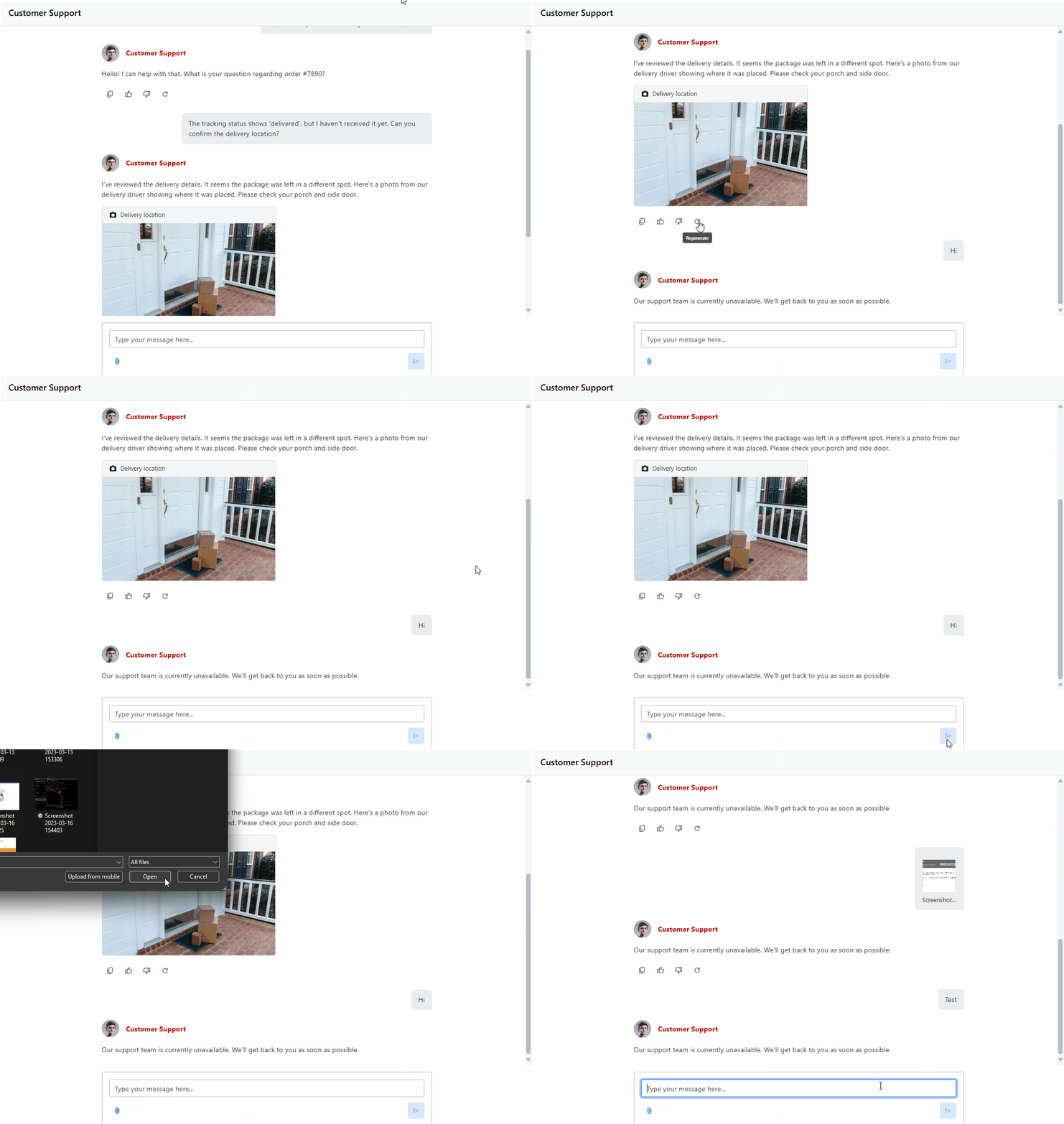
The Ignite UI Chat component provides a complete solution for building conversational interfaces in your applications. Whether you are creating a customer support tool, a collaborative workspace, or a chatbot assistant, the Chat component gives you the building blocks you need: sending and receiving text messages, uploading file attachments, displaying quick reply to suggestions, showing typing indicators when the other participant is writing a response.
Unlike a static message list, the Chat component is interactive and designed for real-time communication. It manages input, rendering, and user interaction while giving you full control over how messages and attachments are displayed. It also exposes an extensive rendering API that lets you override any part of its layout or visuals.
Documentation for Ignite UI for Angular Chat component.
Multiple Entry Points Supporthttps://github.com/IgniteUI/igniteui-angular/blob/master/CHANGELOG.md#multiple-entry-points-support
The Ignite UI for Angular library now supports multiple entry points for better tree-shaking and code splitting. While the main entry point `igniteui-angular` remains fully backwards compatible by re-exporting all granular entry points, we recommend migrating to the new entry points for optimal bundle sizes.
Benefits:
- Better tree-shaking - unused components won’t be bundled
- Code splitting - each component can be lazy-loaded separately
- Smaller bundle sizes - import only what you need
- Improved build performance
Documentation for Ignite UI for Angular Code Splitting and Multiple Entry Points.
Complete CHANGELOG for Ignite UI for Angular 21.0
Themes
https://github.com/IgniteUI/igniteui-angular/blob/master/CHANGELOG.md#themes
-
IgxButton-
Breaking Change
-
The following shadow-related parameters were removed from the
outlined-button-themeandflat-button-theme:resting-shadowhover-shadowfocus-shadowactive-shadow
-
-
New Features
https://github.com/IgniteUI/igniteui-angular/blob/master/CHANGELOG.md#new-features
-
IgxGrid,IgxTreeGrid,IgxHierarchicalGrid- Added PDF export functionality to grid components. Grids can now be exported to PDF format alongside the existing Excel and CSV export options.
The new IgxPdfExporterService follows the same pattern as Excel and CSV exporters:
import { IgxPdfExporterService, IgxPdfExporterOptions } from 'igniteui-angular';

constructor(private pdfExporter: IgxPdfExporterService) {}

exportToPdf() {
    const options = new IgxPdfExporterOptions('MyGridExport');
    options.pageOrientation = 'landscape'; // 'portrait' or 'landscape' (default: 'landscape')
    options.pageSize = 'a4'; // 'a3', 'a4', 'a5', 'letter', 'legal', etc.
    options.fontSize = 10;
    options.showTableBorders = true;

    this.pdfExporter.export(this.grid, options);
}
The grid toolbar exporter component now includes a PDF export button:
<igx-grid-toolbar>
    <igx-grid-toolbar-exporter
        [exportPDF]="true"
        [exportExcel]="true"
        [exportCSV]="true">
    </igx-grid-toolbar-exporter>
</igx-grid-toolbar>
Breaking Changeshttps://github.com/IgniteUI/igniteui-angular/blob/master/CHANGELOG.md#breaking-changes
Dependency Injection Refactor
https://github.com/IgniteUI/igniteui-angular/blob/master/CHANGELOG.md#dependency-injection-refactor
- All internal DI now uses the
inject()API acrossigniteui-angular(no more constructor DI in library code). - If you extend our components/services or call their constructors directly, remove DI params and switch to
inject()(e.g.,protected foo = inject(FooService);). - App usage via templates remains the same; no action needed unless you subclass/override our types.
Multiple Entry Points Supporthttps://github.com/IgniteUI/igniteui-angular/blob/master/CHANGELOG.md#multiple-entry-points-support
The library now supports multiple entry points for better tree-shaking and code splitting. While the main entry point (igniteui-angular) remains fully backwards compatible by re-exporting all granular entry points, we recommend migrating to the new entry points for optimal bundle sizes.
Entry Points:
-
igniteui-angular/core- Core utilities, services, and base types -
igniteui-angular/directives- Common directives -
Component-specific entry points:
igniteui-angular/grids,igniteui-angular/input-group,igniteui-angular/drop-down, etc. -
Grid-specific entry points for tree-shakable imports:
igniteui-angular/grids/core- Shared grid infrastructure (columns, toolbar, filtering, sorting, etc.)igniteui-angular/grids/grid- Standard grid component (IgxGridComponent)igniteui-angular/grids/tree-grid- Tree grid component (IgxTreeGridComponent)igniteui-angular/grids/hierarchical-grid- Hierarchical grid component (IgxHierarchicalGridComponent,IgxRowIslandComponent)igniteui-angular/grids/pivot-grid- Pivot grid component (IgxPivotGridComponent,IgxPivotDataSelectorComponent)
Migration: The ng update migration will prompt you to optionally migrate your imports to the new entry points. If you choose not to migrate, you can continue using the main entry point with full backwards compatibility.
To migrate manually later:
ng update igniteui-angular --migrate-only --from=20.1.0 --to=21.0.0Component Relocations:
- Input directives (
IgxHintDirective,IgxInputDirective,IgxLabelDirective,IgxPrefixDirective,IgxSuffixDirective) →igniteui-angular/input-group IgxAutocompleteDirective→igniteui-angular/drop-downIgxRadioGroupDirective→igniteui-angular/radio
Type Renames (to avoid conflicts):
Direction→CarouselAnimationDirection(in carousel)
Benefits:
- Better tree-shaking - unused components won’t be bundled
- Code splitting - each component can be lazy-loaded separately
- Smaller bundle sizes - import only what you need
- Improved build performance
See the Angular Package Format documentation for more details on entry points.
To Wrap It All Up…
Seamlessly crafted for compatibility, Ignite UI for Angular is the library that enables you to leverage the power of the latest technologies and major releases. Committed to providing you with the best Angular UI toolkit and related insights, our goal is to equip you with more know-how, new features, enhanced performance, and improved stability. Some of the enhancements were added thanks to the requests from users like yourself through our Ignite UI for Angular GitHub repository. With this in mind, we are always open to suggestions and feedback – it makes us grow and better respond to your development needs.
If you need more details, we encourage you to check out our: