Angular Azure Maps의 이미지
AngularIgxAzureMapsImagery는 마이크로소프트®가 제공하는 지리 이미지 매핑 서비스입니다. 세계 여러 지리 이미지 타일 스타일을 제공합니다. 이 지리 이미지 서비스는 www.azure.microsoft.com 웹사이트에서 직접 접근할 수 있습니다. Ignite UI for Angular 지도 컴포넌트는 클래스를 사용해IgxAzureMapsImagery Azure Maps의 지리 이미지를 지도 배경 콘텐츠에 표시할 수 있습니다.
Angular Displaying Imagery from Azure Maps - Overview
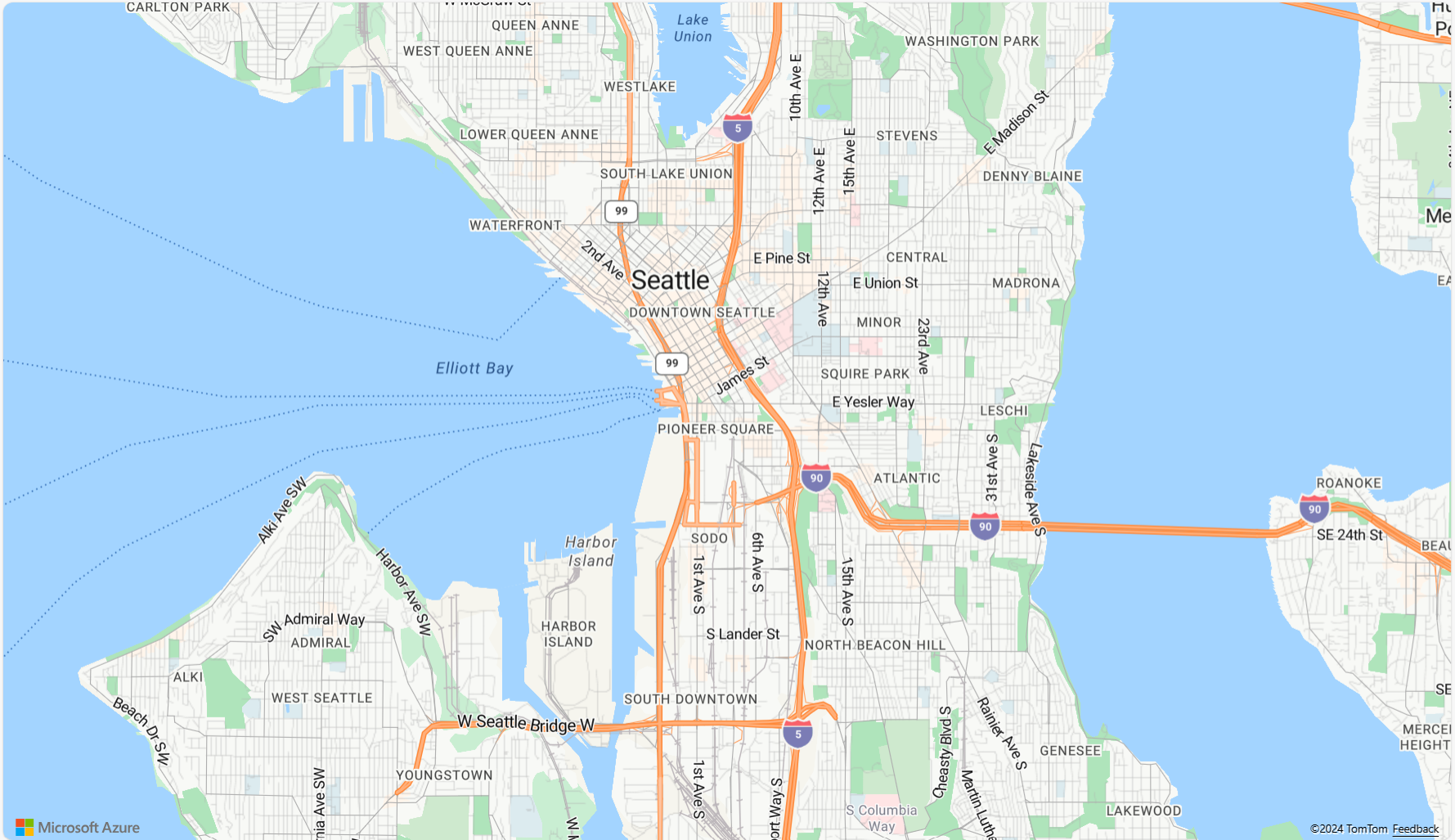
Angular Displaying Imagery from Azure Maps - Code Example
다음 코드 스니펫은 Azure Maps에서 AngularIgxGeographicMapComponent 클래스를 사용해IgxAzureMapsImagery 지리 이미지 타일을 표시하는 방법을 보여줍니다.
<igx-geographic-map #map
    width="100%"
    height="100%"
    zoomable="true" >
</igx-geographic-map>
import { IgxGeographicMapComponent } from 'igniteui-angular-maps';
import { IgxAzureMapsImagery } from 'igniteui-angular-maps';
// ...
const tileSource = new IgxAzureMapsImagery();
tileSource.apiKey = "YOUR_Azure_MAPS_API_KEY";
tileSource.imageryStyle = AzureMapsImageryStyle.Satellite; // or
tileSource.imageryStyle = AzureMapsImageryStyle.TerraOverlay; // or
tileSource.imageryStyle = AzureMapsImageryStyle.Road; //or Traffic & Weather etc.

this.map.backgroundContent = tileSource;
Angular Overlaying Imagery from Azure Maps - Overview
작업할 때IgxGeographicTileSeriesComponent는 오버 레이 (교통, 날씨, 라벨)를 기본 지도 스타일 위에 결합할 수 있습니다. 예를 들어위성, 도로, 혹은 다크그레이. 예를 들어 TerraOverlay를 사용하기. 지형을 시각화하는 위성.
- 기본 스타일: 위성, 도로, 테라, 다크 그레이가 핵심 배경 타일을 제공합니다.
- 오버레이 스타일: 교통 및 날씨 이미지(예
TrafficRelativeOverlay: ,)WeatherRadarOverlay는 타일 시리즈에 할당하여 기본 스타일 위에 레이어링하도록 설계되었습니다. - 하이브리드 스타일: 기본 스타일과 라벨, 도로 등 오버레이를 결합
HybridRoadOverlayHybridDarkGreyOverlay하는 변형 버전이 있어서 여러 레이어를 수동으로 관리할 필요가 없습니다.
이 디자인을 사용하면 다음과 같이 더 풍부한 지도를 구축할 수 있습니다.
- TrafficOverlay를 사용하여 위성 이미지를 표시하여 실제 이미지의 혼잡을 강조 표시합니다.
- WeatherRadarOverlay와 함께 Terra를 사용하여 강수량이 있는 지형을 시각화합니다.
- LabelsRoadOverlay와 함께 DarkGrey를 적용하여 대시보드 친화적이고 대비가 많은 보기를 제공합니다.

Angular Overlaying Imagery from Azure Maps - Code Example
다음 코드 스니펫은 배경 이미지 위에 지리 이미지 타일을 표시하는 방법을 보여줍니다. AngularIgxGeographicMapComponent 사용하는IgxAzureMapsImagery 차량과IgxGeographicTileSeriesComponent 클래스를 위한 어두운 회색 지도가 제공됩니다.
<igx-geographic-map #map height="100%" width="100%" zoomable="true">
  <igx-geographic-tile-series #tileSeries></igx-geographic-tile-series>
</igx-geographic-map>
export class AppComponent implements AfterViewInit {
  @ViewChild('map', { static: true }) public map!: IgxGeographicMapComponent;
  @ViewChild('tileSeries', { static: true }) public tileSeries!: IgxGeographicTileSeriesComponent;

  public azureImagery!: IgxAzureMapsImagery;
  public azureKey: string = "<YOUR_KEY_HERE>";

  ngAfterViewInit(): void {
    // Update TileSeries
    const overlay = new IgxAzureMapsImagery();
    overlay.apiKey = this.azureKey;
    overlay.imageryStyle = AzureMapsImageryStyle.TrafficAbsoluteOverlay;
    this.tileSeries.tileImagery = overlay;

    // Update Map Background
    this.azureImagery = new IgxAzureMapsImagery();
    this.azureImagery.apiKey = this.azureKey;
    this.azureImagery.imageryStyle = AzureMapsImageryStyle.DarkGrey;
    this.map.backgroundContent = this.azureImagery;
  }
}
Properties
다음 표는 이IgxAzureMapsImagery 클래스의 성질을 요약합니다:
| 속성 이름 | 부동산 유형 | 설명 |
|---|---|---|
apiKey |
끈 | Azure Maps 이미지 서비스에 필요한 API 키를 설정하기 위한 속성을 나타냅니다. 이 키는 azure.microsoft.com 웹 사이트에서 가져와야 합니다. |
imageryStyle |
AzureMapsImageryStyle |
Azure Maps 이미지 타일 맵 스타일을 설정하기 위한 속성을 나타냅니다. 이 속성은 다음AzureMapsImageryStyle 열거형 값으로 설정할 수 있습니다.
|
API References
 GitHub