계층적 그리드 로드 온디맨드
The Ignite UI for Blazor IgbHierarchicalGrid allows fast rendering by requesting the minimum amount of data to be retrieved from the server so that the user can see the result in view and interact with the visible data as quickly as possible. Initially only the root grid’s data is retrieved and rendered, only after the user expands a row containing a child grid, he will receive the data for that particular child grid. This mechanism, also known as Load on Demand, can be easily configured to work with any remote data.
이 항목에서는 이미 사용 가능한 원격 서비스와 통신하는 원격 서비스 공급자를 만들어 요청 시 로드를 구성하는 방법을 보여 줍니다. 다음은 작업 데모이며 나중에 단계별로 살펴보고 생성 과정을 설명합니다.
Blazor Hierarchical Grid Load On Demand Example
Remote Service Provider
먼저 계층적 그리드에 필요한 데이터를 얻을 수 있도록 서비스 공급자를 준비합니다.
Getting basic data
우리는 브라우저가 제공하는 글로벌 기능을 사용하여fetch() HTTP 프로토콜을 통해 백엔드 서비스와 통신할 예정입니다. 이렇게 하면 데이터를 얻기 위해 우리 서비스에서 다음과 같은 간단한 방법이 필요합니다:
function getData(dataState) {
    return fetch(buildUrl(dataState))
        .then((result) => result.json());
}
보buildUrl() 시다시피, 우리가 받은 데이터를 바탕으로 URL을 생성하는 방법이 될 것입니다. 우리는 Promise를 반환하는데, 이는 비동기적으로 실행되기 때문입니다. 그렇게 하면 나중에 구독하고, 신청서에서 더 처리한 뒤 그리드에 전달할 수 있습니다.
Building our request url
다음으로 GET 요청의 URL을 어떻게 구축해야 하는지 정의할 것입니다. 여기서 메인 그리드의 데이터를 얻을 수 있을 뿐만 아니라 그 안의 자식 그리드의 데이터도 얻을 수 있습니다. 우리는 다음을 사용할 것입니다Customers이 자료에서 주제 우리의 루트 레벨과 용도에 대해Orders 그리고Details 하층 구역을 위해서요. 모델은 애플리케이션마다 다르지만 다음 모델을 사용할 것입니다:
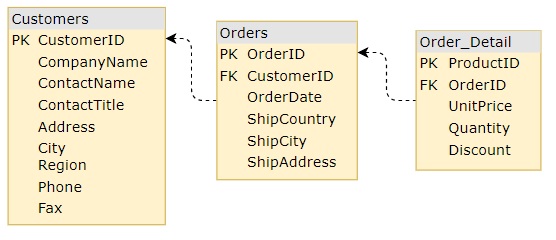
먼저 필요한 것은 원하는 그리드의 데이터를 어디서 얻을지, 부모 행의 기본 키, 그리고 고유 ID를 결정하기 위해 테이블의 데이터를key 결정하는 것입니다.
이 모든 것을 객체 안에서dataState 정의할 것입니다. 예를 들어:
const dataState: {
    key: string;
    parentID: any;
    parentKey: string;
    rootLevel: boolean;
} = {
    //...
};

function buildUrl(dataState) {
    let qS = "";
    if (dataState) {
        if (dataState.rootLevel) {
            qS += `${dataState.key}`;
        } else {
            qS += `${dataState.parentKey}/${dataState.parentID}/${dataState.key}`;
        }
    }
    return `${DATA_URL}${qS}`;
}
Result
마지막으로 원격 서비스는 다음과 같습니다.
const DATA_URL = `https://data-northwind.indigo.design/`;

function getData(dataState) {
    return fetch(buildUrl(dataState))
        .then((result) => result.json());
}

function buildUrl(dataState) {
    let qS = "";
    if (dataState) {
        if (dataState.rootLevel) {
            qS += `${dataState.key}`;
        } else {
            qS += `${dataState.parentKey}/${dataState.parentID}/${dataState.key}`;
        }
    }
    return `${DATA_URL}${qS}`;
}
Hierarchical Grid Setup
다음으로 계층적 그리드를 설정하고 이를 원격 서비스 공급자에 연결하겠습니다.
Template defining
먼저 우리가 기대하는 계층 구조 수준을 포함한 계층적 격자 템플릿을 정의할 것입니다. 우리는 고객의 루트 그리드PrimaryKey가 그들의 주문에 대해 1단계customerId-그리고 주문 세부 정보에orderId 대해 -를 가지고 있다는productId 것을 알고 있습니다. 각 데이터베이스 테이블과 그 키를 알면 초기 템플릿을 정의할 수 있습니다:
<IgbHierarchicalGrid Id="hGrid" PrimaryKey="customerId" Height="600px">
    <IgbColumn Field="customerId" Hidden="true"></IgbColumn>
    <IgbColumn Field="companyName" Header="Company Name"></IgbColumn>
    <IgbColumn Field="contactName" Header="Contact Name"></IgbColumn>
    <IgbColumn Field="contactTitle" Header="Contact Title"></IgbColumn>
    <IgbColumn Field="address.country" Header="Country"></IgbColumn>
    <IgbColumn Field="address.phone" Header="Phone"></IgbColumn>
    <IgbRowIsland ChildDataKey="Orders" PrimaryKey="orderId">
        <IgbColumn Field="orderId" Hidden="true"></IgbColumn>
        <IgbColumn Field="shipAddress.country" Header="Ship Country"></IgbColumn>
        <IgbColumn Field="shipAddress.city" Header="Ship City"></IgbColumn>
        <IgbColumn Field="shipAddress.street" Header="Ship Address"></IgbColumn>
        <IgbColumn Field="orderDate" Header="Order Date" DataType="GridColumnDataType.Date"></IgbColumn>
        <IgbRowIsland ChildDataKey="Details" PrimaryKey="productId">
            <IgbColumn Field="productId" Hidden="true"></IgbColumn>
            <IgbColumn Field="quantity" Header="Quantity"></IgbColumn>
            <IgbColumn Field="unitPrice" Header="Unit Price"></IgbColumn>
            <IgbColumn Field="discount" Header="Discount"></IgbColumn>
        </IgbRowIsland>
    </IgbRowIsland>
</IgbHierarchicalGrid>
하지만 템플릿에는 한 가지 빠진 것이 있는데, 그것은 루트 수준 계층적 그리드에 대한 데이터이며, 결국 그 자식입니다.
우리는 나중에 코드에서 서비스에서 데이터를 얻은 후 참조를Id="hGrid" 사용할 수 있기 때문에 루트 그리드의 데이터를 쉽게 설정할 수 있습니다.
확장된 자녀의 데이터를 설정하는 것은 조금 다릅니다. 행이 처음 확장되면 새로운 자식IgbHierarchicalGrid이 렌더링되고, 새로 생성된 그리드의 참조를 받아 데이터를 설정해야 합니다. 그래서 각IgbRowIsland 컴포넌트는 해당 행 섬에 대해 새로운 자식 그리드가 생성될 때 발생하는 이벤트를 제공합니다GridCreated. 이를 이용해 새 그리드에 필요한 참조를 얻고, 서비스에 데이터를 요청한 뒤 적용할 수 있습니다.
루트 수준, 행 아일랜드의 키, 상위 행의 기본 키 및 고유 식별자인 경우에만 정보가 필요하도록 서비스를 구축했기 때문에 모든 행 아일랜드에 대해 하나의 방법을 사용할 수 있습니다. 이 모든 정보는 이벤트 인수에서 직접 액세스하거나 이벤트 트리거를 담당하는 행 아일랜드에서 액세스할 수 있습니다.
우리가 사용할OnGridCreated 방법을 정해봅시다.
Since the GridCreated event provides the parentID property, a reference to the row island as owner and the new child grid property, it will be passed as the first argument. We are only missing information about the parent row's primaryKey, but we can easily determine that based on the row island ChildDataKey.
이러한 변경 내용이 추가된 템플릿 파일은 다음과 같습니다.
<IgbHierarchicalGrid Id="hGrid" PrimaryKey="customerId" Height="600px">
    <IgbColumn Field="customerId" Hidden="true"></IgbColumn>
    <IgbColumn Field="companyName" Header="Company Name"></IgbColumn>
    <IgbColumn Field="contactName" Header="Contact Name"></IgbColumn>
    <IgbColumn Field="contactTitle" Header="Contact Title"></IgbColumn>
    <IgbColumn Field="address.country" Header="Country"></IgbColumn>
    <IgbColumn Field="address.phone" Header="Phone"></IgbColumn>
    <IgbRowIsland ChildDataKey="Orders" PrimaryKey="orderId" GridCreatedScript="OnGridCreated">
        <IgbColumn Field="orderId" Hidden="true"></IgbColumn>
        <IgbColumn Field="shipAddress.country" Header="Ship Country"></IgbColumn>
        <IgbColumn Field="shipAddress.city" Header="Ship City"></IgbColumn>
        <IgbColumn Field="shipAddress.street" Header="Ship Address"></IgbColumn>
        <IgbColumn Field="orderDate" Header="Order Date" DataType="GridColumnDataType.Date"></IgbColumn>
        <IgbRowIsland ChildDataKey="Details" PrimaryKey="productId" GridCreatedScript="OnGridCreated">
            <IgbColumn Field="productId" Hidden="true"></IgbColumn>
            <IgbColumn Field="quantity" Header="Quantity"></IgbColumn>
            <IgbColumn Field="unitPrice" Header="Unit Price"></IgbColumn>
            <IgbColumn Field="discount" Header="Discount"></IgbColumn>
        </IgbRowIsland>
    </IgbRowIsland>
</IgbHierarchicalGrid>
Connecting our service
이제 마지막 단계 중 하나는 이전에 만든 서비스를 계층적 그리드에 연결하는 것입니다.
We will get a reference to our root grid to set its data. In order to make sure that our grid is rendered before we request its data from the service and assign it, we will use the Rendered event. As it doesn't have any parents we can only pass that rootLevel is true, and the key for it, to the getData of our service. Since it returns a Promise we will need to subscribe to it:
igRegisterScript("OnGridRendered", () => {
    const grid = document.getElementById("hGrid");

    getData({ parentID: null, rootLevel: true, key: "Customers" }).then(
        (data) => {
            grid.data = data;
            grid.markForCheck();
        });
}, false)
다음으로, 새로 생성된 자식 그리드에 대해 데이터를 요청하는 메서드만 만들OnGridCreated 면 됩니다.
루트 레벨 그리드 데이터를 얻는 것과 비슷하지만, 이번에는 더 많은 정보를 전달해야 합니다. 예를 들어parentID와parentKey 같은 것입니다.rootLevel 어떤 자녀에게도 거짓 일 것입니다:
igRegisterScript("OnGridCreated", (args) => {
    const context = args.detail;
    const _parentKey = context.owner.childDataKey === "Orders" ? "Customers" : "Orders";
    const dataState = {
        key: context.owner.childDataKey,
        parentID: context.parentID,
        parentKey: _parentKey,
        rootLevel: false,
    };

    getData(dataState).then((data) => {
        context.grid.data = data;
        context.grid.markForCheck();
    });
}, false)
이로써 애플리케이션 설정은 거의 완료되었습니다. 이 마지막 단계는 데이터가 계속 로드되고 있음을 사용자에게 알려 빈 그리드를 않아도 되도록 하여 사용자 경험을 개선하는 것을 목표로 합니다. 그래서IgbHierarchicalGrid 그리드가 비어 있을 때도 표시할 수 있는 로딩 표시기를 지원합니다. 새로운 데이터가 수신되면 로딩 표시기가 숨겨지고 데이터가 렌더링됩니다.
Setup of loading indication
그IgbHierarchicalGrid 로딩 표시기를 표시할 수 있는 이유는IsLoading property를 참 하지만 데이터는 없습니다. 루트 그리드에 대해 처음에 설정해야 하고, 새 자식 그리드를 생성할 때도 데이터가 로드될 때까지 설정해야 합니다. 우리는 언제든지 다음 모드로 설정할 수 있습니다 참 템플릿에 포함되지만, 서비스가 빈 배열을 반환할 경우 그리드에 데이터가 없다는 표시를 하고 싶습니다. 거짓.
이 경우 구성의 최종 버전은 다음과 같습니다.
igRegisterScript("OnGridRendered", () => {
    const grid = document.getElementById("hGrid");

    grid.isLoading = true;

    getData({ parentID: null, rootLevel: true, key: "Customers" }).then(
        (data) => {
            grid.isLoading = false;
            grid.data = data;
            grid.markForCheck();
        });
}, false)

igRegisterScript("OnGridCreated", (args) => {
    const context = args.detail;
    const _parentKey = context.owner.childDataKey === "Orders" ? "Customers" : "Orders";
    const dataState = {
        key: context.owner.childDataKey,
        parentID: context.parentID,
        parentKey: _parentKey,
        rootLevel: false,
    };

    context.grid.isLoading = true;

    getData(dataState).then((data) => {
        context.grid.isLoading = false;
        context.grid.data = data;
        context.grid.markForCheck();
    });
}, false)
API References
Additional Resources
우리 커뮤니티는 활동적이며 항상 새로운 아이디어를 환영합니다.